Category Archives: Programming

Posts about computer programming.

How Dijkstra’s Algorithm Works (The Logic Behind It).

Recently I started working on a library in Haskell that would implement dijkstra’s algorithm both for fun and for an upcoming project. What I learned is that I didn’t initially understand dijkstra’s algorithm as well as I had thought and many of the explanations out there weren’t very good and often relied on showing an example of it in action.

Teach principles, not formulas.

– Richard Feynman

Let’s learn the logic behind Dijkstra’s algorithm, shall we?

What’s the point of it?

To the best of my knowledge, Dijkstra’s algorithm only shows up in a few places (There are only two or three that I’m aware of), but it’s vital to understand if you want to play around with graph theory, and if you want to traverse graphs.

There’s this amazing technology out there that you may have heard of. It’s called GPS technology. Technically GPS refers to the global positioning system. It’s a system of satellites in space that send out radio signals which can be received by any GPS capable device which can then use those signals to calculate the exact latitude, longitude, and height of the device.

However, when most people think of GPS they think of navigation systems that can give you directions. That’s what we’ll be looking at here. Dijkstra’s algorithm allows us to plan the shortest route from point A to point B.

The first step in Dijkstra’s algorithm actually comes before we’ve even written any lines of code to implement dijkstra’s algorithm. We need a map. Thankfully there are maps out there that we can download of entire cities that are machine-readable. The idea is simple: take a map and turn it into what’s called a “graph”.

A graph (as in the kind from graph theory) is a set of circles (called “nodes”) and lines connecting them (called “edges”). There’s more than one kind of graph. For our example we’ll be looking at graphs that are directed and weighted. Directed means they have arrows instead of just regular lines (sometimes streets are one-way), and weighted meaning that each arrow has a number attached to it to indicate how long the path is, or how much time it will take to get there.

The edges will be roads, and the nodes will be intersections. For streets that go both ways we can simply set up a second arrow that points in reverse. So for one-way roads there will be one arrow, and for two-way roads there will be two pointing in opposite directions.

Once we have that our navigation system will figure out which node is closest to where we are, and which node is closest to the destination and have use navigate a short distance to the start, and when we get to the end it will say something like “Your destination is on the left” and then it will cowardly end the trip and not tell us how to get out of the car and walk into the building we’re headed for.

Getting lost in it

So how do we navigate graphs? Up until now everything is fairly simple, but how do you get the shorted path from A to B? When designing an algorithm (or, in our case, understanding one) we need to be able to have some insights into the problem. For example: if we were to magically somehow know that a given node is part of the shortest path from A to B then the shortest path from A to that node is the first part of the trip, and the shortest path from our middle node to B is the second part of the trip.

If we know the shortest path from the start node to each node on the graph then we’ve essentially solved the problem. We just need to get the path associated with the end node.

So here’s how we do it. First we’ll create an army of wind-up robots that will go through the graph. Each of these wind up robots will be a data structure which contains two pieces of information: the total distance the bot has traveled so far from the starting node, and the exact path it took. The distance can be an integer or float, and the path variable is a list (or array if you’re brave enough) containing the names of (or pointers to) each node that we’ve traveled along so far in the order we’ve gone.

Each node is a data structure which has a name of some kind (an integer or string) and an array or list of edges. These edges are each data structures that contain a number (their weight) and a pointer or identifier that points to their destination node. We’ll also tack on two pieces of information to the node structs: the distance we’ve traveled to get there, and the path we took (just like with our bots).

When a wind-up robot crosses an edge it takes the number from that edge and adds it to it’s internal number, and adds the edge it just crossed to the path variable inside it (this is a fairly obvious thing to do since that’s what traveling along a graph means). Now, assuming that all edges have a positive, non-infinite number associated with them, we should be able to pull off a simple trick: when a bot lands on a new node it will check the number the node has, and if the number on the node is greater than the number the bot is carrying then the bot replaces the number on that node with the one it was carrying. It also does the same with the path variable it had.

When another bot later finds itself on that node, if the bot had found a shorter path to get there then it will replace the path and number on that node. If it took a longer path then it will be able to tell from comparing the number on the node to it’s number and it will know to backtrack to where it just came from.

Hopefully some gears are starting to turn in your head. We’ll initialize every nodes’ number to be infinity because all numbers are less than infinity and because floating point numbers can represent infinity as a value (pretty handy here) except for the start node which will be zero. All their paths will initially be empty as well.

This sounds a lot like a problem involving recursion, doesn’t it? We could write a function that acts as one single bot and it can take in our initial node. It will then call itself once for each edge that node has as it travels along them. It can follow the rules from earlier and after it’s done investigating every top-level edge it should have visited every node enough times to have found the shortest path to that node, and so we should have solved the problem by that point.

Here’s some pseudo code:

function dijkstra (distSoFar, pathSoFar, node):
        if distSoFar < node.dist:
                node.dist = distSoFar
                node.path = pathSoFar
        for edge in node.edges:
                dijkstra(distSoFar + edge.weight, pathSoFar + edge,edge.destNode) 

And that’s how it’s done. Except for a few problems: the first problem is that it doesn’t uses parallelism despite the fact that that seems like it could work here (that’s really a crime in itself). The second problem is that it takes way too long to run. I tried implementing it in Haskell with a dash of parallelism and left it running overnight on a graph of New York city and it wasn’t finished in the morning.

The Problem

The algorithm, as described, isn’t fast enough on large graphs. So what’s the real answer?We have to rethink some things here. First we’ll get rid of putting the path onto each node, and instead store info on what edge it was that took us to that node from the shortest path (thus each node has info on what node came just before it, and what edge was used to get there).

We’ll also drop carrying the path in each bot, and instead focus on just the distances. Once all is said and done we can work backwards from the end node to build up a path to it. So how can we do all of this more efficiently? This is where priority queues come into play.

First make a queue that contains pointers to all nodes which are initialized to infinity and have some undefined value for the previous node except, of course, for the start node which will have a distance of zero.

Then we let our bot loose on the start node. It goes along each edge going out from the node, but doesn’t recurse down the next edges. For each node it meets it decides whether or not to update the distance on that node. The bot will also not accumulate distances anymore and instead will just use the distance from the node it just left and add that to the weight of the edge it traveled along.

Next we have a list of data structures that point to each node. Most of the nodes still have an infinite distance, but some of them have different finite distances. So we sort the list based on the distances that each node has (or do the smart thing and not call up a sort function every time by simply knowing what nodes to try and move and not checking the entire list) and now the first node in the queue has the shortest distance (the start node since that started with zero).

Then we remove the first node from the queue. Then for every entry in the queue we do the same. We have a bot travel along from that node along each outgoing edge that node has, update the distances, resort the priority queue, and then drop the first entry in the queue.

This ensures that we are starting at the start node, and slowly working our way to each adjacent node, and then each node after that, and then the ones after that. On the graph it looks like we’re fanning out from the start node.

According to Wikipedia we’ll be done either once we reach the end node on the queue or when there are no more nodes in the queue (stopping at the end node seems to be some sort of optimization). The idea is that we’re starting with the node that has the shortest distance each time we look at the priority queue, and updating the adjacent nodes so that they can (possibly) be updated by the node with the shortest path so far.

The nodes that are updated each round can sometimes be the nodes that were already removed from the queue, and every node will have a chance to update all of their neighbors. All nodes get reached eventually since we’re pulling them from a queue and since we’re always starting with the shortest distances that means every node will be quickly updated with the shorter distances first.

The nodes that are updated each round can sometimes be the nodes that were already removed from the queue, and every node will have a chance to update all of their neighbors. All nodes get reached eventually since we’re pulling them from a queue and since we’re always starting with the shortest distances that means every node will be quickly updated with the shorter distances first.

List Of Programming Project Ideas.

The best way to learn to program is to work on projects, so here’s some ideas for projects for beginners, intermediate, and advanced programmers. Remember: it doesn’t matter whether or not you finish these projects. What matters is what you learn along the way. If you have any ideas for things to add to this list you can leave a comment with it.

Pseudo code (good for warm ups):

  • Write a procedure for a made up assembly language that blinks a light on and off.
  • Write a procedure for a robot that has it replace a tire on a car.
  • Create a finite state machine diagram for a mobile robot that finds a red ball and returns it to the robot’s charging location.
  • Write a procedure for sorting a given list of numbers from least to greatest.
  • Write the pseudo code for a self-driving car that can go around the block.
  • Write a procedure for a computer chip that opens a window when it receives a radio signal from a button.
  • Do some research on how ants in an ant colony behave (basically how ant colonies work) and come up with the pseudo code for a robot ant that will work with other robot ants to try and act like an ant colony.

Assembly:

  • A program that exits with return status 0
  • A program that prints “hello, world”

C/rust/zig:

  • A Linux kernel driver for a USB button.
  • A C standard library that has memory allocation using the buddy algorithm.
  • An arduino program that blinks an LED.
  • An arduino program which turns on a motor which closes or opens a window based on the temperature.
  • A program that uses loops to print out the lyrics to 99 bottles of beer on the wall.

Golang:

  • A library that parses xml concurrently.
  • A Simple web server that serves up one html page.
  • A web server that serves up all files in the current directory.
  • A concurrent pipeline that reads in MNIST samples and uses image magicke to turn them into files, and maybe apply some optional filters.
  • A concurrent system that runs dijkstra’s algorithm.
  • A web server that uses youtube-dl to download youtube videos automatically, save them, and play them back to whoever owns the server.
  • A program that uses concurrency, and image magicke to automagically fix the gamma settings for a huge number of image files in parallel.

Prolog:

  • A script that helps you pick out parts for a PC.
  • A simple package manager using an sqlite library.
  • A script that lets you access firefox web history and use readln to issue queries about it.
  • A script that acts as a pharmacist.
  • A script that checks the school schedules of a student for overlapping classes.
  • A script that extracts all links from an html page (note: you will need a library for this).
  • A script that can manage hospital beds at a hospital and decide what options the staff would have if there’s not enough resources for everyone.

Haskell:

  • A program that takes an integer and tells you if the integer is prime using a parallelized brute force method.
  • Implement the game 2048 using a lazily evaluated tree containing every possible game. 
  • A password cracker that uses the Control.Parallel.Strategies library.
  • A program that takes in an adjacency list as a CSV file and spits out an adjacency matrix.
  • A program that runs K-means image segmentation on it’s input using the accelerate library for GPU acceleration.
  • A neural network library that uses dependent types, and the accelerate library.
  • A program that can lazily generate all possible tweets.
  • A program that lazily generates and prints the fibonacci sequence (note: you will have to set stdout buffering to line buffering).
  • A sudoku game that uses the state monad.
  • A program that takes in a list of urls from standard input and (in parallel) checks each of them to see if their servers are up, and the prints to standard output the names of any that are not responding.
  • A program that attempts to crack RSA encryption using parallelism (bonus points if you use a GPU to help).
  • A program that uses parallelism, the state monad, and the writer monad to check and possibly fix broken git repositories (you’ll want to learn how git works internally for this).
  • A program that acts as an emulator for a made up assembly language using Monad transformers

Bash:

  • An rsync wrapper that backs up your files using snapshot backups.
  • A program that finds duplicate files in a directory and makes them the same file using hard links so as to save space.
  • A script that grabs a random line from a given file.
  • A script that renames every file to include the date and time it was modified in the file name.
  • A script that uses a regular expression to check if a given input is a valid phone number.
  • Write a script that goes through a directory and all of it’s sub-directories and deletes all images.

Lex and Yacc:

  • An XML parser.
  • A C compiler.
  • A programming language that has all the features you wish other programming languages had.
  • A parser for the wavefront obj file format.

Erlang:

  • A simple web forum using the yaws program.
  • A gopher server.
  • A bank website.
  • A server that can serve up videos.
  • A Debian package server using this specification.
  • A mastodon web server.
  • A web server that says “Hello, world” via a web page (use yaws to make this easier).
  • A server that takes in lines from over a network connection, shuffles them, and then sends them to a different specified connection (note: you should assume that not all the lines being given to the server can fit in the memory of just one computer).

Python:

  • An XKCD comic downloader.
  • A script that uses AI to draw googly eyes on images.
  • A program that simulates a galton board, and prints out how often each pocket gets a ball in it.
  • A calculator program with a GUI using a GUI library.
  • A program that prints out the lyrics to 99 bottles of beer on the wall using loops.
  • A program with an interactive prompt that asks the user what it should do and makes function calls to various things it can do (like “remove [filename]” or “tell me the time” or something).
  • A program that asks for two numbers, and then calculates the length of the hypotenuse of a right triangle with those two numbers being the side lengths (hint: use the pythagorean theorem).
  • A program that uses objects to keep track of cars for a dealership.

Lisp:

  • A script that takes in a list of birthdays and the names of people associated with them, checks the date, and says happy birthday to anyone who’s birthday is on the current date.
  • A script that takes in a list of numbers and tells you how often each number shows up.
  • A program that takes in a list of numbers and returns the average, and standard deviation of those numbers.

Octave/Matlab:

  • A script that uses rotation, scaling, and translation matrices to trilaterate the position of a thing given it’s distances to four given points in 3D space.
  • A neural network script.

Pytorch:

  • A script that can read a text file and summarize it using transformers.
  • A script that can look at a picture of an injury or something and provide a diagnosis using AI. Bonus points if you can write a script that automatically scrapes images from the web of injuries as your data set.

Projects where you’ll have to decide on your own what language to use:

  • A program that reads in a wavefront obj file and displays it in a window, and the user can rotate the model around to see it from different angles.
  • A twitter client that uses ncurses.
  • A quick script or program that can generate the sound of what hydrogen should theoretically sound like when excited.
  • A remote controlled differential drive robot (note: this will require some knowledge of electrical engineering).
  • A program that argues with the user (bonus points if it uses AI).
  • Add a new feature to an existing project on github.com
  • A series of programs that enables you to create a genetic breeding model for machine learning.
  • A program that reads an image from a file and blurs it using the image magick library.
  • A web server that accepts images uploaded from the user and let’s the user view them afterwards.


How I Made A Wheely Robot.

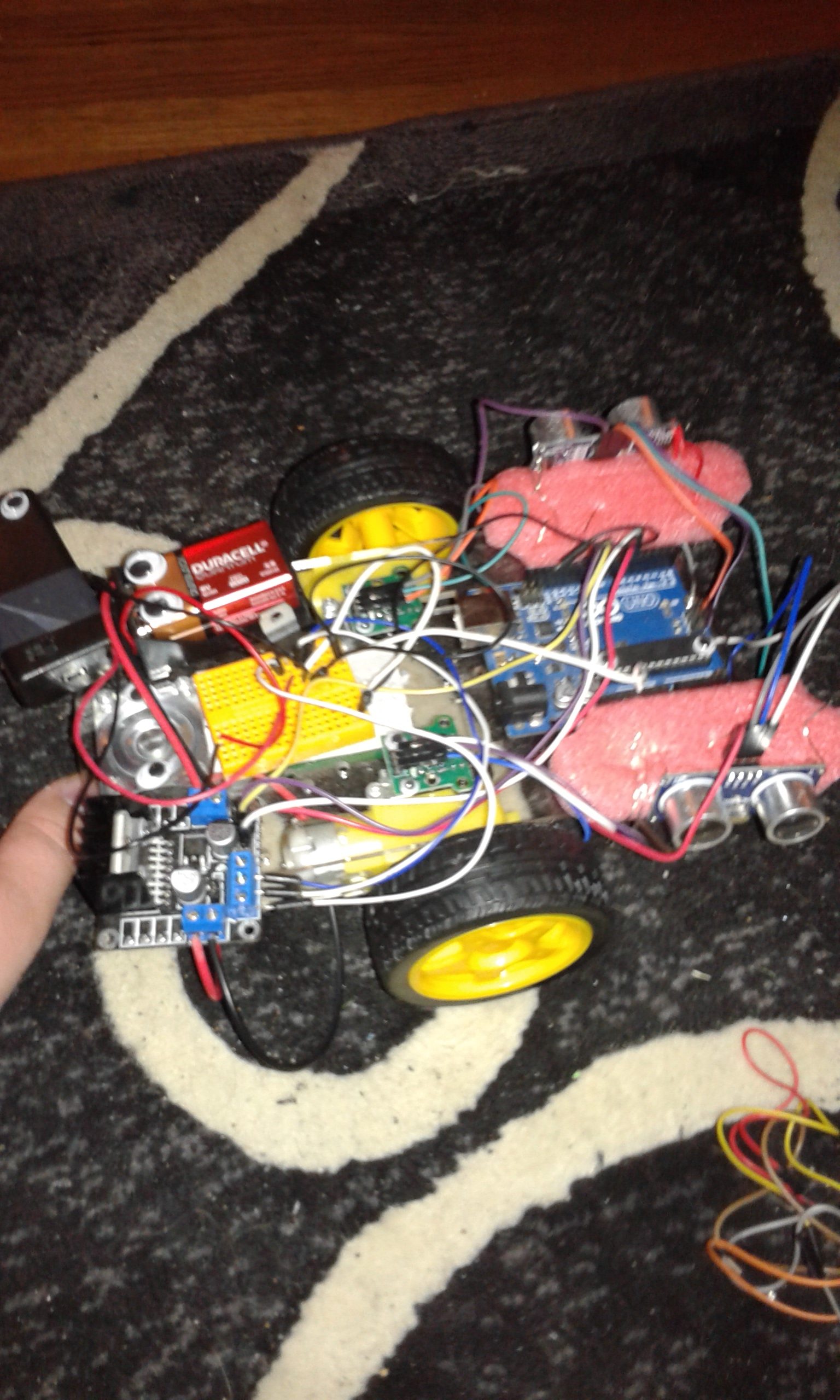
So far I’ve had a policy of only making updates when I’ve completed a project, but instead I’m going to post an update of a project that’s still in progress since it would take so long to finish. Introducing: the wheely robot.
20160515_220806
Note that I’m not exactly the best photographer yet, but at least you can figure out that it’s a robot.

So what does it do? Well so far I’ve been working on it as a sort of experiment on how to program robots.
A problem that I’ve run into before with earlier attempts at building robots was that I might tell the robot to move forward some distance (like for example: one meter), and it would move forward, but if something was in the way, or its wheels didn’t get as much traction as it thought it was getting then it would stop too soon, and not realize that it hadn’t actually reached the goal.

The problem at its core was that the earlier robots weren’t aware of the kinds of the fact that when they try to do something, that thing might not have actually gotten done because of some kind of obstacle. That’s where the fancier kinds of programming come into play.

The first fancy programming trick is what’s called a “PID controller”. The idea is pretty simple: the robot tells its wheels to move forward at speed x, and there are sensors at the wheels that tell the robot how fast its wheels are ACTUALLY moving, and then that data goes to the computer which uses an algorithm known as the “PID controller” that adjusts to any variations in speed.

More info here:
https://youtu.be/ZhYi7x0rMoE?list=PLkHsKoi6eZnx9zMNsvL9ni7–2Lvyb88d

This is a pretty simple way to adapt to problems, my robot uses wheel encoders to figure out where the wheels are, and they aren’t a very good way to get sensor feedback which is why I’m working on getting more sensors for it.

I’ve also added multiple computers onto it. One handles sensor data since there will be so many sensors on the robot in the future, and one controls everything. The two communicate via i2c. With fancier programming techniques I could someday get it to use behavior-based robotics to go around obstacles (more info here, and here).

I’m also keeping a github repo for it here which will hopefully have some useful info (note: I’ve made changes to it recently which I haven’t tested). I’ve also setup an amazon wish-list here that has (almost) all the parts I used (it as of this writing doesn’t contain the screws that I used to screw everything in).

I’m hoping to someday make this go throughout my apartment and pick up things off the floor for me before a vacuum robot goes through.

A tutorial on Maxima

I’ve recently found out about a programming language called “Maxima”.

Maxima is a computer algebra system, which means that it can do algebra (as well as many other kinds of Math) for you. Here is a tutorial on how to use it.

Note that I admittedly haven’t read the tutorial as I already know how to use Maxima, but the tutorial is on its sourceforge page so I’m just going to trust it.